
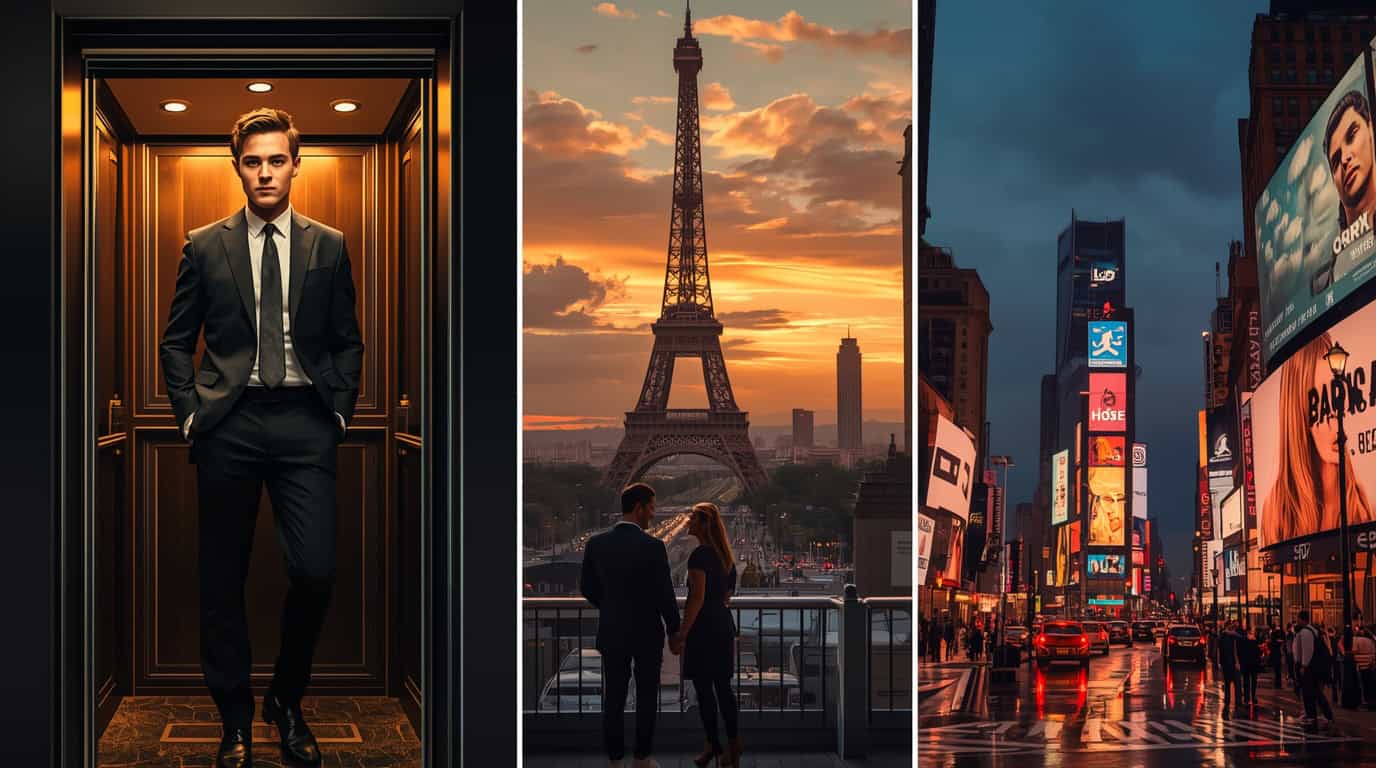
Gemini AI milik Google dan Nano Banana yang kini sedang viral membuat cara orang mengedit foto berubah total. Foto biasa bisa disulap jadi potret profesional, bergaya ala CEO, atau bahkan liburan ke luar negeri hanya dengan satu instruksi singkat.
Keunggulan utama kedua AI ini adalah kemampuannya menjaga wajah asli dari foto yang diunggah. Outfit, background, dan pencahayaan akan disesuaikan berdasarkan detail prompt. Karena itu, selalu gunakan kalimat “based on my uploaded photo” agar AI tidak mengganti wajah dengan model lain.
Mengapa Prompt Detail Menentukan Hasil
Prompt adalah “bahasa” komunikasi dengan AI. Instruksi yang singkat akan menghasilkan foto biasa-biasa saja. Tapi kalau detail ditambahkan—mulai dari outfit, lighting, hingga mood—hasilnya bisa tampak nyata.
Contoh sederhana: slim-fit black suit inside a modern elevator with cinematic lighting akan menghasilkan foto profesional, sementara beige coat in front of Eiffel Tower during golden hour langsung menghadirkan nuansa romantis Paris.
15+ Prompt Gemini AI & Nano Banana Paling Hits
✦ Formal & Professional
"Based on my uploaded photo, transform it into a formal portrait. Add a slim-fit black suit, standing inside a modern elevator with cinematic dramatic lighting.""Based on my uploaded photo, make it look like a CEO profile. Add a light gray three-piece suit, striped tie, skyscraper balcony background with bold lighting.""Based on my uploaded photo, reimagine it as an intellectual portrait. Dark brown suit, striped white shirt, knitted tie, classic library background with golden warm light.""Based on my uploaded photo, edit it into a futuristic corridor portrait. Black suit with silver tie, cinematic shadows and neon beams.""Based on my uploaded photo, transform it into a gentleman portrait. Brown tweed suit, white oxford shirt, bow tie, vintage study with fireplace and classic paintings."
✦ Travel & Lifestyle
"Based on my uploaded photo, edit it into a Times Square night scene. Denim jacket with hoodie, neon billboards, wet street reflections, neon glow illuminating my face.""Based on my uploaded photo, transform it into a Paris golden-hour portrait. Beige coat with scarf, Eiffel Tower at sunset, warm romantic lighting.""Based on my uploaded photo, create a Cappadocia sunrise balcony scene. Hot air balloons in the sky, burgundy cardigan, flowing white maxi skirt, dreamy soft glow.""Based on my uploaded photo, make it look like London in autumn near Big Ben. Trench coat with scarf, orange leaves falling, cloudy sky, elegant daylight.""Based on my uploaded photo, edit it into a Japanese street portrait. Vending machines, kanji signs, cafés, cinematic nostalgic Fuji tones.""Based on my uploaded photo, create Jiufen Old Street Taiwan background. Cream knit sweater, small backpack, red lanterns, stone-paved alleys, warm natural daylight.""Based on my uploaded photo, transform it into a Kuala Lumpur rooftop scene. Petronas Twin Towers glowing at night, romantic luxurious vibe.""Based on my uploaded photo, edit it into a Swiss mountain scenery. Fur coat, cream trousers, European houses, green meadows, clear blue sky.""Based on my uploaded photo, make it look like Central Park in autumn. Brown coat with scarf, golden leaves on the ground, warm sunlight filtering through trees.""Based on my uploaded photo, transform it into a cinematic airport walkway scene. Black crop jacket, cream cargo pants, chunky sneakers, pink suitcase, daylight shining through glass windows."
✦ Variasi Tambahan
"Based on my uploaded photo, make it look like a futuristic AI portrait. Metallic silver suit, holographic glowing background, neon reflections for a sci-fi vibe.""Based on my uploaded photo, edit it into a noir cinematic portrait. Black trench coat, rainy street with neon reflections, dramatic moody atmosphere.""Based on my uploaded photo, transform it into a Shibuya Crossing night editorial. Neon lights, stylish modern outfit, busy Tokyo crowd with cinematic aesthetic."
Tips Agar Hasil Lebih Realistis
- Gunakan foto dengan resolusi tinggi agar detail wajah jelas.
- Tambahkan pencahayaan spesifik: cinematic, golden hour, dramatic shadows.
- Detailkan outfit: jas slim-fit, coat beige, atau casual hoodie.
- Eksperimen dengan berbagai suasana untuk hasil lebih variatif.
- Jangan lupa selalu pakai “based on my uploaded photo”.
Kesimpulan
Gemini AI dan Nano Banana membuka jalan baru bagi siapa saja untuk tampil estetik. Dari foto sederhana, hasilnya bisa terlihat seperti pemotretan profesional atau liburan ke destinasi dunia. Dengan 15+ prompt di atas, kamu bisa langsung mencobanya sendiri.
Tren ini membuktikan bahwa kreativitas dalam menulis prompt akan menentukan seberapa realistis hasil yang keluar. Semakin detail instruksi, semakin natural hasil fotonya—dan siap viral di sosial media.